Detect Data Drift
Description
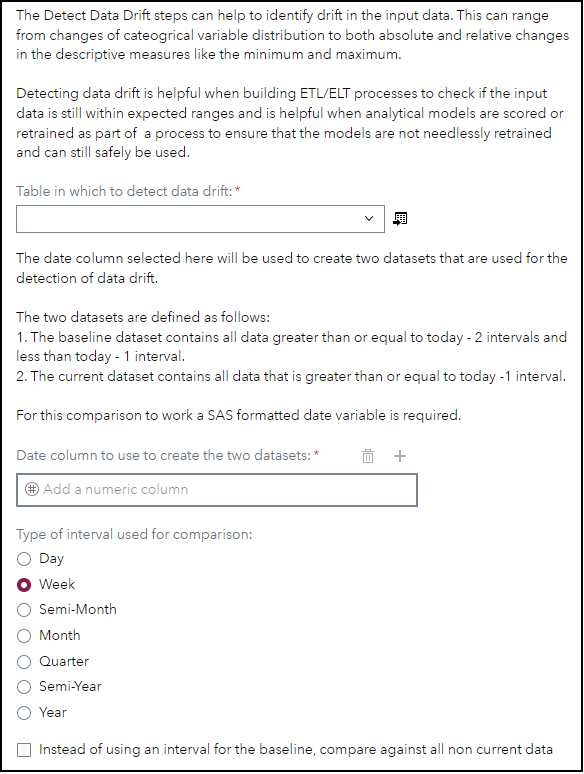
The "Detect Data Drift" custom steps performs a number of calculations and creates metrics for tracking changes that happen in a dataset. For this comparison a date variable and an interval is required to compare the data. Detecting data drift is helpful when building ETL/ELT processes to check if the input data is still within expected ranges and is helpful when analytical models are scored or retrained as part of a process to ensure that the models are not needlessly retrained and can still safely be used.
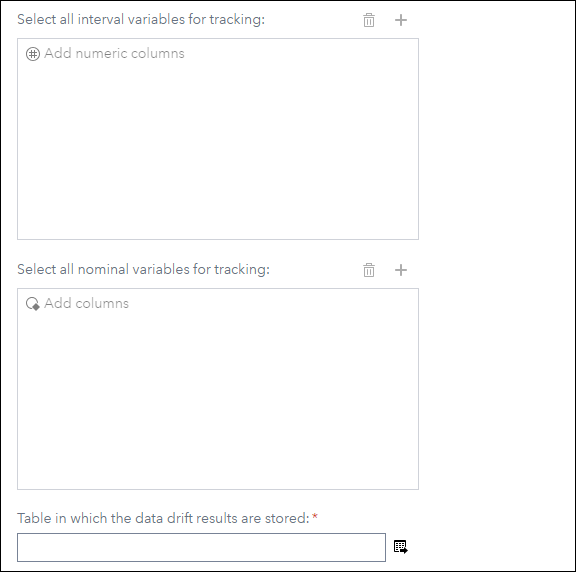
As input table provide all of the data, then from the input data and the interval two datasets are created:
- The current dataset which contains data greater than the interval - 1 to the run date of this step
- The baseline dataset which contains data between the interval -2 and -1 to the run date of this step
The output table contains the following metrics - in brackets you will find for which types of variables the metric is tracked, PCT is short for percentage:
- sumDifference (interval)
- sumDifferencePCT (interval)
- minDifference (interval)
- minDifferencePCT (interval)
- maxDifference (interval)
- maxDifferencePCT (interval)
- meanDifference (interval)
- meanDifferencePCT (interval)
- medianDifference (interval)
- medianDifferencePCT (interval)
- nmissDifference (both)
- nmissDifferencePCT (both)
- cssDifference (interval)
- cssDifferencePCT (interval)
- cvDifference (interval)
- cvDifferencePCT (interval)
- prtDifference (interval)
- prtDifferencePCT (interval)
- rangeDifference (interval)
- rangeDifferencePCT (interval)
- stdDifference (interval)
- stdDifferencePCT (interval)
- stderrDifference (interval)
- stderrDifferencePCT (interval)
- tDifference (interval)
- tDifferencePCT (interval)
- ussDifference (interval)
- ussDifferencePCT (interval)
- varDifference (interval)
- varDifferencePCT (interval)
- p1Difference (interval)
- p1DifferencePCT (interval)
- p25Difference (interval)
- p25DifferencePCT (interval)
- p75Difference (interval)
- p75DifferencePCT (interval)
- p99Difference (interval)
- p99DifferencePCT (interval)
- lclmDifference (interval)
- lclmDifferencePCT (interval)
- uclmDifference (interval)
- uclmDifferencePCT (interval)
- modeDifference (interval)
- modeDifferencePCT (interval)
- qrangeDifference (interval)
- qrangeDifferencePCT (interval)
- kurtosisDifference (interval)
- kurtosisDifferencePCT (interval)
- skewnessDifference (interval)
- skewnessDifferencePCT (interval)
- countDifference (both)
- countDifferencePCT (both)
- totalDifference (both)
- totalDifferencePCT (both)
- numberOfCategoriesBaseline (nominal)
- numberOfCategoriesCurrent (nominal)
- numberOfCategoriesDifference (nominal)
- numberOfCategoriesDifferencePCT (nominal)
- differingCategories (nominal)
User Interface
Requirements
SAS Viya 2024.07 or later
Potential Future Enhancements
This section contains some additional ideas to enhance the step in a future release:
- Display baseline and current graphs next to each other - see https://blogs.sas.com/content/iml/2016/03/09/comparative-panel-overlay-histograms-sas.html for inspiration
- Add SAS Visual Analytics report example to visualize the results in an interactive way
- Calculate metrics like PSI
Usage
Find a demonstration of this step in this YouTube video: Detect Data Drift | Custom Step.
If you want to run a test using the data shown in the video here is the code to generate it:
* Sample data creation;
data work.hmeq_data_drift;
    length customerID captureDate 8.;
    format captureDate date9.;

    set sampsio.hmeq;

    customerID = _n_;

    * This only adds a new date value each 10 rows;
    captureDate = today() - ceil(_n_ / 10);
run;
Change Log
- Version 1.2 (15AUG2024)
- Update proc univariate output
- Version 1.1 (12AUG2024)
- Improve UI
- Add full baseline parameter
- Version 1.0 (29JUL2024)
- Initial version